Why Your Business Isn't Ranking on Google Maps
Your business may have a great product, excellent service and happy customers — but that does not automatically mean Google will place you at the top of local search results.
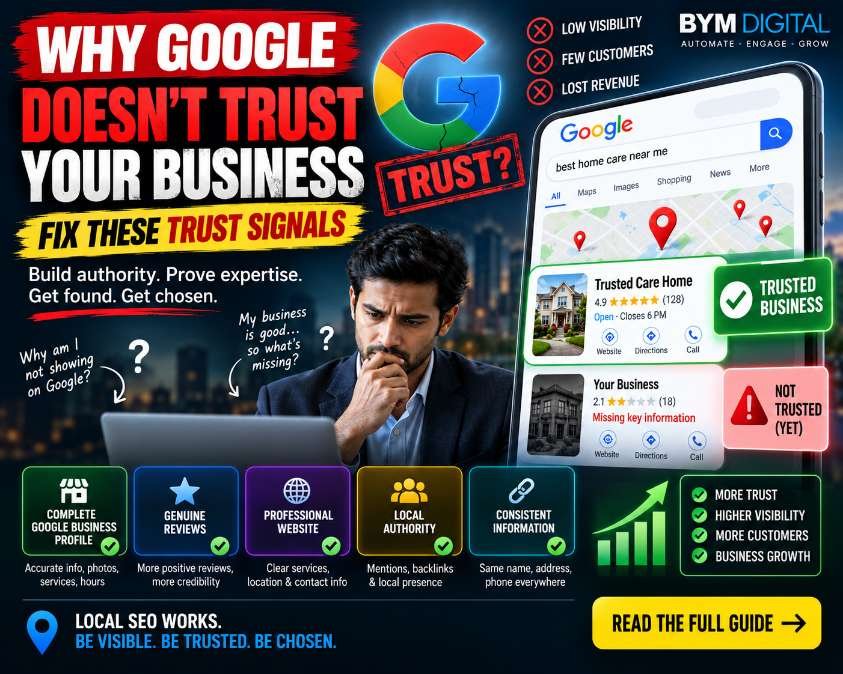
Google's local ranking systems primarily consider relevance, distance and prominence. Businesses need to make it easy for Google to understand what they offer, where they operate and how prominent they are online.
This is why local SEO is not about one secret ranking trick. It is about implementing the right signals consistently across your Google Business Profile, website, reviews and broader online presence.
First: There Is No Single Google 'Trust Score'
One important clarification: Google does not publish a single numerical 'trust score' for businesses.
Instead, local search rankings use multiple signals. Google describes the main factors as relevance, distance and prominence.
So instead of asking, 'How do I increase my Google trust score?', businesses should ask: 'Have we given Google enough accurate, relevant and credible information about our business?'
1. Verify Your Google Business Profile
The first implementation step is simple: make sure your business is eligible for and has a verified Google Business Profile.
Google states that verified businesses can manage how their business information appears on Search and Maps.
Implement this:
- Claim or create your Google Business Profile.
- Complete Google's verification process.
- Make sure the correct business owner or authorized manager controls the profile.
- Check for duplicate profiles and resolve ownership issues.
2. Fix Your Business Name, Address and Phone Information
Your core business information must be accurate.
Incorrect addresses, outdated phone numbers, wrong opening hours or inconsistent business details can create unnecessary confusion for customers and search systems.
Implement this:
- Use your real-world business name.
- Enter the correct business address when applicable.
- Use the correct primary phone number.
- Add your official website.
- Keep opening hours accurate.
- Update special holiday hours.
- Check the same information across important business listings.
3. Choose the Correct Primary Business Category
Your category helps Google understand what your business is and what searches it may be relevant for.
Do not choose a category simply because it contains a keyword you want to rank for. Select the category that most accurately represents your actual business.
Implement this:
- Review your primary category.
- Add relevant additional categories where appropriate.
- Make sure your website and Business Profile describe the same core business.
- Avoid misleading categories or keyword stuffing.
4. Complete Your Services and Business Information
A partially completed Business Profile gives Google and customers less information about what you actually offer.
Implement this:
- Add your actual services.
- Write clear service descriptions.
- Add relevant business attributes.
- Keep business hours updated.
- Add useful customer-facing information.
- Upload relevant photos and videos.
Google specifically recommends complete and accurate business information because it helps Google understand the business and match it with relevant searches.
5. Build a Real Review Generation System
Reviews are not just a reputation tool. Google says review count and review scores can factor into local ranking, and more reviews and positive ratings can help local ranking.
However, businesses should never buy reviews or offer incentives for positive reviews. Google requires reviews to reflect genuine customer experiences.
Implement this:
- Create a simple process for asking genuine customers for reviews.
- Use Google's review link or QR code.
- Ask customers after a real interaction or completed service.
- Respond professionally to reviews.
- Respond to negative reviews without arguing or exposing customer information.
- Never purchase fake reviews.
- Never offer discounts or gifts in exchange for positive reviews.
6. Respond to Reviews Properly
Getting reviews is only half of the reputation process. Your responses are public and are part of how potential customers see your business.
Implement this:
- Thank customers for genuine positive feedback.
- Answer legitimate questions.
- Keep responses professional and relevant.
- Address complaints calmly.
- Move sensitive customer issues to private communication.
- Do not copy-paste the exact same response to every customer.
7. Add Real Business Photos and Videos
Your Business Profile should show customers what your business actually looks like and what you offer.
Implement this:
- Add a clear exterior photo.
- Add interior photos where relevant.
- Show your team or working environment when appropriate.
- Show products or completed work.
- Add service-related images.
- Replace outdated images.
Do not use misleading images simply to make the profile look better.
8. Build a Strong Local SEO Website
Your Google Business Profile should not be treated as a standalone asset. Your website should clearly explain what your business does and where it operates.
Implement this on your website:
- Create dedicated service pages.
- Create location pages when they are genuinely useful.
- Clearly display business contact information.
- Use descriptive page titles and headings.
- Add relevant internal links.
- Make the website mobile-friendly.
- Improve page speed and technical SEO.
- Add appropriate structured data where applicable.
- Publish useful local and industry content.
9. Build Genuine Local Authority
Google says prominence can be influenced by information across the web, including links and reviews.
This means local SEO should extend beyond your Google Business Profile.
Implement this:
- Get listed in relevant local business directories.
- Maintain accurate business information on important platforms.
- Build relationships with relevant local organizations.
- Earn legitimate mentions from local publications.
- Earn relevant backlinks from industry websites.
- Participate in legitimate local partnerships and events.
Do not build hundreds of spammy backlinks simply to manipulate rankings. Focus on relevance and genuine authority.
10. Fix Inconsistent Business Information
Search engines can find business information from multiple sources across the web. Google says local listing information can come from publicly available web content, third-party data, user contributions and information provided through Business Profiles.
Implement this:
- Search Google for your business name.
- Find old addresses or phone numbers.
- Check major directories.
- Check social profiles.
- Update outdated information.
- Remove or resolve duplicate listings where possible.
11. Add Useful Business Links
Where available for your business category, use Business Profile links to make it easier for customers to take action.
Implement this:
- Add your official website.
- Add booking links when applicable.
- Add appointment links when applicable.
- Add ordering links for eligible businesses.
- Make sure destination pages work correctly on mobile.
12. Measure Google Business Profile Performance
Don't optimize blindly. Google provides Business Profile performance information showing how customers discover and interact with your profile.
Track this regularly:
- Search visibility.
- Maps visibility.
- Website clicks.
- Calls.
- Direction requests.
- Customer interactions.
- Review growth.
Use this information to identify what is improving and where customers are dropping off.
13. Check Whether You Have a Policy or Profile Problem
Sometimes poor visibility is not simply an SEO ranking problem.
Your Business Profile may have incorrect information, ownership problems, duplicates, restrictions or suspension issues.
Implement this:
- Check whether your profile is verified.
- Check for suspension notifications.
- Review profile eligibility and representation guidelines.
- Check for duplicate profiles.
- Make sure your business information accurately represents the real business.
The Real Google Maps SEO Checklist
Before expecting stronger local visibility, make sure you have implemented these fundamentals:
- ✓ Verified Google Business Profile
- ✓ Correct business name
- ✓ Accurate address
- ✓ Correct phone number
- ✓ Accurate opening hours
- ✓ Correct primary category
- ✓ Relevant services
- ✓ Complete business information
- ✓ Real business photos
- ✓ Genuine customer reviews
- ✓ Professional review responses
- ✓ Strong local SEO website
- ✓ Consistent business information
- ✓ Relevant local citations
- ✓ Genuine local backlinks and mentions
- ✓ Working website and action links
- ✓ Regular performance tracking
- ✓ No duplicate or suspended profile issues
What You Should NOT Do
Local SEO shortcuts can create more problems than they solve.
- Do not buy fake Google reviews.
- Do not pay people to post fake reviews.
- Do not offer rewards for positive reviews.
- Do not keyword-stuff your business name.
- Do not create fake business locations.
- Do not create duplicate Business Profiles.
- Do not buy large quantities of spammy backlinks.
- Do not publish fake business information.
Google explicitly prohibits incentivized or fake review activity, and businesses should follow Google's Business Profile guidelines.
Why Your Competitor May Be Ranking Above You
If a competitor consistently appears above your business, it does not necessarily mean Google 'trusts them more' in a simple yes-or-no sense.
They may have stronger relevance for the search, greater prominence, more genuine reviews, stronger web authority, better profile information, or simply be closer to the person searching.
Google's local ranking system considers multiple factors, so the correct response is to audit the complete local search presence rather than changing one field and expecting an immediate ranking jump.
The 30-Day Local SEO Implementation Plan
Week 1: Fix the Foundation
- Verify the Google Business Profile.
- Fix name, address and phone information.
- Correct business hours.
- Review primary and additional categories.
- Complete services and attributes.
Week 2: Improve Reputation
- Create a genuine review request process.
- Respond to existing reviews.
- Resolve legitimate customer complaints.
- Add high-quality business photos.
Week 3: Improve Website Authority
- Optimize core service pages.
- Improve local landing pages where appropriate.
- Fix internal linking.
- Improve mobile experience.
- Check technical SEO.
- Build relevant local relationships and citations.
Week 4: Measure and Improve
- Review Business Profile performance.
- Track calls and website visits.
- Monitor important local search queries.
- Compare your profile with genuine competitors.
- Identify missing services, content or authority signals.
- Create the next 30-day optimization plan.
Final Takeaway
Google Maps visibility is not about finding one secret 'trust signal'. It is about building a business presence that is accurate, relevant, credible and useful.
Start with the fundamentals: verify your profile, complete your information, choose accurate categories, build genuine reviews, add real photos, improve your website, maintain consistent business information and build legitimate local authority.
Then measure the results and keep improving.
Build the signals. Improve visibility. Earn the click.
Need help implementing a local SEO and digital growth strategy? Contact BYM Digital to discuss your business.
FAQs
Why is my business not showing on Google Maps?
Common reasons include an unverified or incomplete Business Profile, inaccurate information, weak relevance for the search, limited prominence, profile issues or simply being farther from the searcher than competing businesses.
Does Google have a trust score for businesses?
No. Google does not publish a single business trust score. Local rankings are primarily based on relevance, distance and prominence.
Do Google reviews improve local ranking?
Google says review count and review scores can factor into local ranking. More reviews and positive ratings can help a business's local ranking.
How long does local SEO take?
There is no guaranteed timeline for ranking improvements. Local visibility depends on competition, location, relevance, prominence and many other factors. Businesses should treat local SEO as an ongoing optimization process rather than a one-time task.